 Case study
Solution
Information Architecture
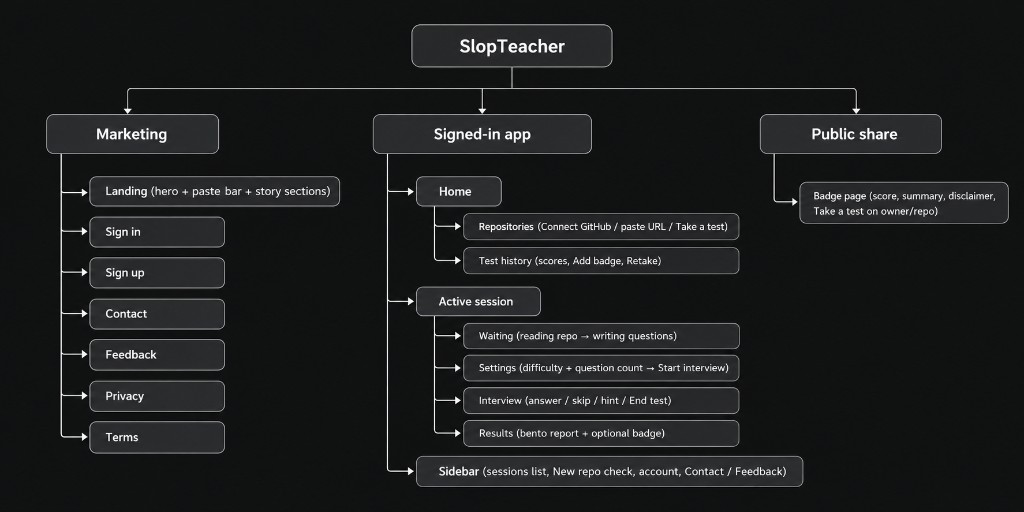
The product maps into three surfaces: marketing, the signed-in app, and public share pages for badges.
User Flows
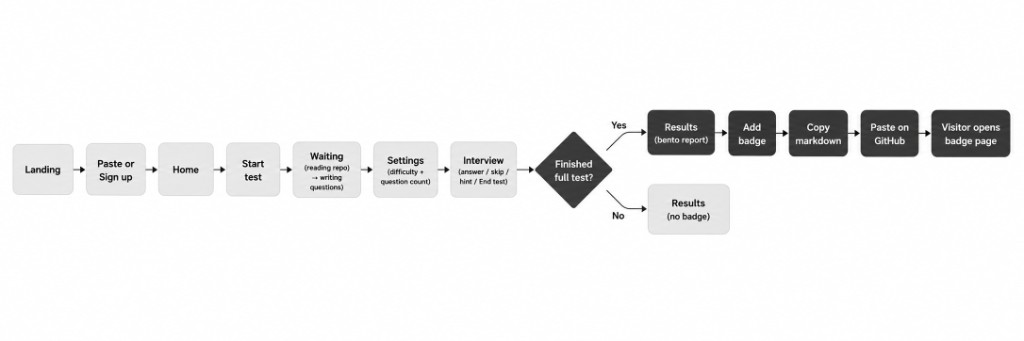
The core path runs from landing paste through interview. A full finished test can unlock badge sharing; ending early still shows results without a badge.
Design Decisions
These are locked choices already made in the product, not proposals.
| Decision | What we chose |
|---|---|
| Landing refresh for marketing | Stronger first screen: brand name at hero scale, promise headline ("Prove you wrote it, not the model."), then story sections: How it works, What you get, Who it is for. |
| Quick CTA: GitHub paste bar | Hero includes a search-style pill field ("paste your repo/github profile") with Continue, so the main action is immediate before Sign up / Sign in. |
| Results to bento layout | Test results redesigned into a readable multi-block layout: summary + actions beside a score card; below, Pass / Pending / Slop tabs beside resources, not a dense single column. |
| GitHub badges as proof of work | After a full completed test, the user can share a result: copy README markdown for a badge image that links to a simple public score page. Results stay private until they choose to share. |
| Ship UI on the testing branch first | Marketing and UI changes were rolled out on the testing branch for validation. This phase was not treated as a full production launch. |
Badge rules (user language)
- A test that ends early cannot get a badge.
- Sharing makes that one result public via a secret link for that result.
- The public page states that the badge records a quiz score. It explicitly clarifies that it is not proof the publisher wrote the code.
Prototype
Instead of using Figma, we took an Agentic AI approach and deployed directly into testing branches before production, which resulted in faster development.
Final Product
The live product is available at slopteacher.com.

 Website